Build from source
git clone https://github.com/bucketgit/bgit.git
cd bgit
go build -o bgit . BucketGit
Git repositories on GCS, S3, and local object storage
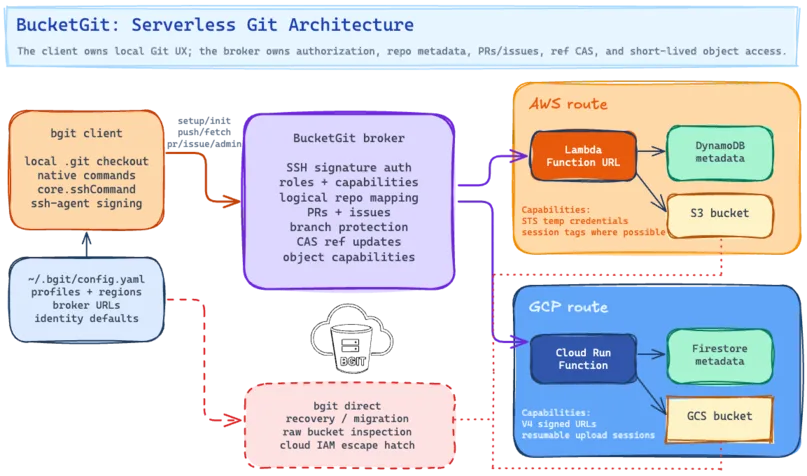
bgit keeps normal Git checkouts on disk while storing
repository objects and refs directly in GCS, S3, or local object
storage. Access is
brokered with SSH keys, roles, pull requests, issues, branch
protection, task boards, CI records, and short-lived object-transfer
capabilities.
git clone https://github.com/bucketgit/bgit.git
cd bgit
go build -o bgit .brew tap bucketgit/bgit
brew install bgitSetup
bgit setup is the interactive broker setup and
management tool. It discovers GCP and AWS profiles, creates or
updates brokers, imports owner SSH keys, manages users and teams,
and stores profile metadata in ~/.bgit/config.yaml.
bgit setup
# Choose cloud profiles, regions, owner keys,
# users, teams, and global name/email.bgit setup profile create --provider gcp work
bgit setup profile create --provider aws workbgit init --noninteractive \
--repo app \
--profile work.europe-west1 \
--team core
bgit push --profile work --region europe-west1bgit setup
bgit config --local user.name "Ada Lovelace"
bgit config --local user.email ada@example.combgit whoami
bgit whoami --all
bgit repos minebgit admin repo info
bgit admin protect list
bgit ci listbgit admin broker upgrade
bgit admin broker owner-bootstrap reset
bgit admin ci rotate-secretCreate A Repository
bgit init configures a standard .git
checkout, a flat logical repository name, a broker profile, native Git
SSH transport, and repository identity. The broker maps logical
names to physical buckets and prefixes.
bgit admin repo create --team core app
mkdir app
cd app
bgit init
echo "# App" > README.md
bgit add README.md
bgit commit -m "Initial commit"
bgit pushbgit admin repo create --team core app
bgit init --noninteractive \
--repo app \
--profile work.eu-west-1 \
--team core
bgit add -A
bgit commit -m "Initial commit"
bgit pushbgit clone file://app.git
bgit clone s3://app.git --profile work --region eu-west-1
bgit clone gs://app.git --profile work --region europe-west1Custom Domains
BucketGit can discover brokers from exact-FQDN TXT records. For
https://git.example.com/..., publish records at
_bgit.git.example.com.
v=bgit1 broker=https://broker.example.com \
team=t_abcd1234 name=platformbgit clone https://git.example.com/platform/app.git ./app
bgit clone https://git.example.com/platform/app/app.git ./appbgit clone https://broker.example.com/app.git ./app
bgit clone https://broker.example.com/core/app.git ./appSSH Bridge And Web UI
bgit setup manages broker profiles, owner SSH keys,
users, and teams. Native Git fetch and push then use
bgit as the SSH transport while repository data remains
in GCS or S3.
bgit setup
bgit init
git remote -v
git fetch
git pushgit clone bgit::https://broker.example.com/app.git
git clone bgit://app.git
git remote add origin bgit::app.git
git remote add archive bgit::s3://bucket/path/app.gitbgit admin keys list
bgit admin keys add --user ada --role developer --key ~/.ssh/ada.pub
bgit admin keys import-github octocat --role triage
bgit admin protect add mainbgit web
open http://127.0.0.1:8042/
bgit web --local
bgit web --port 9000# Broker-owned ref updates use role checks,
# branch protection, and compare-and-swap.
bgit push
git push
# Native Git uses bgit as its SSH bridge.BucketGit Web Interface Screenshots
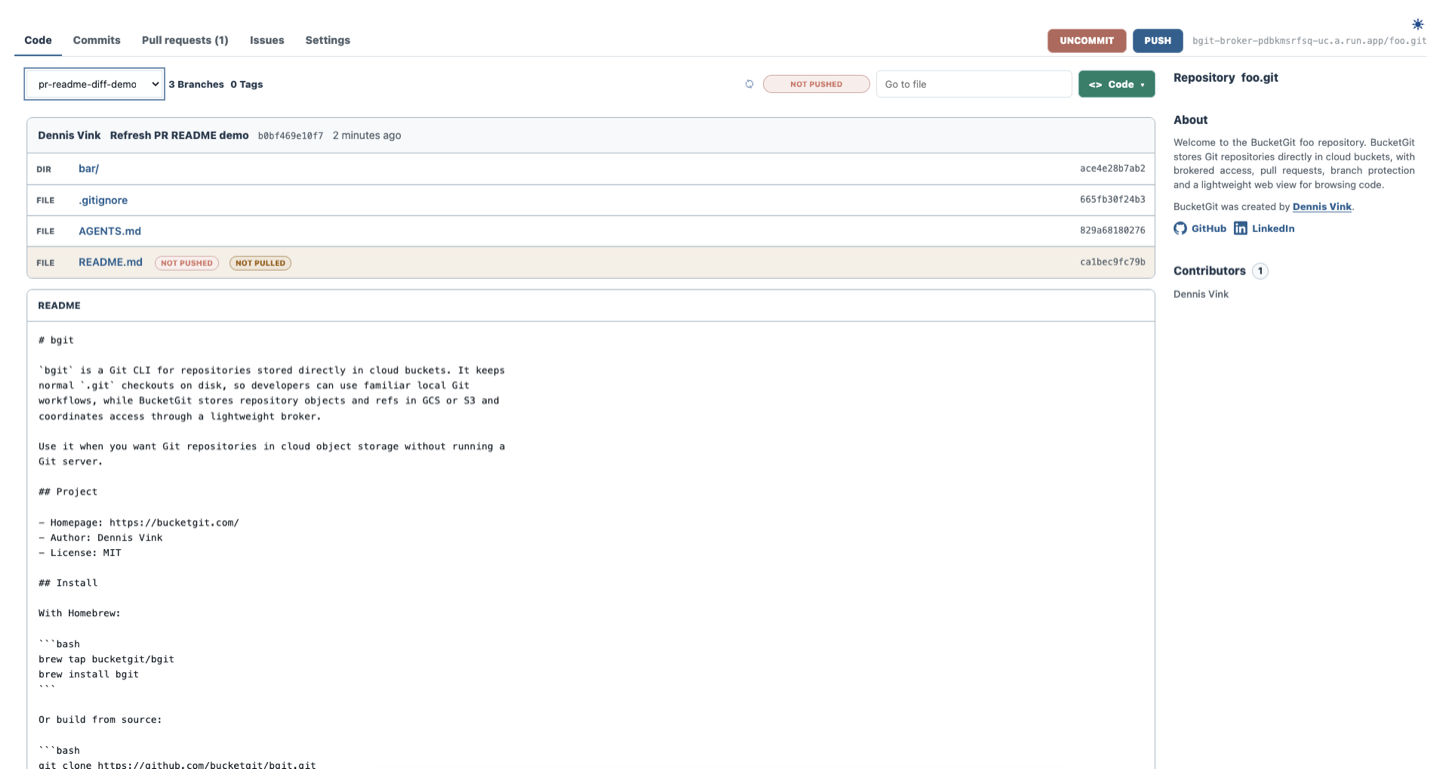
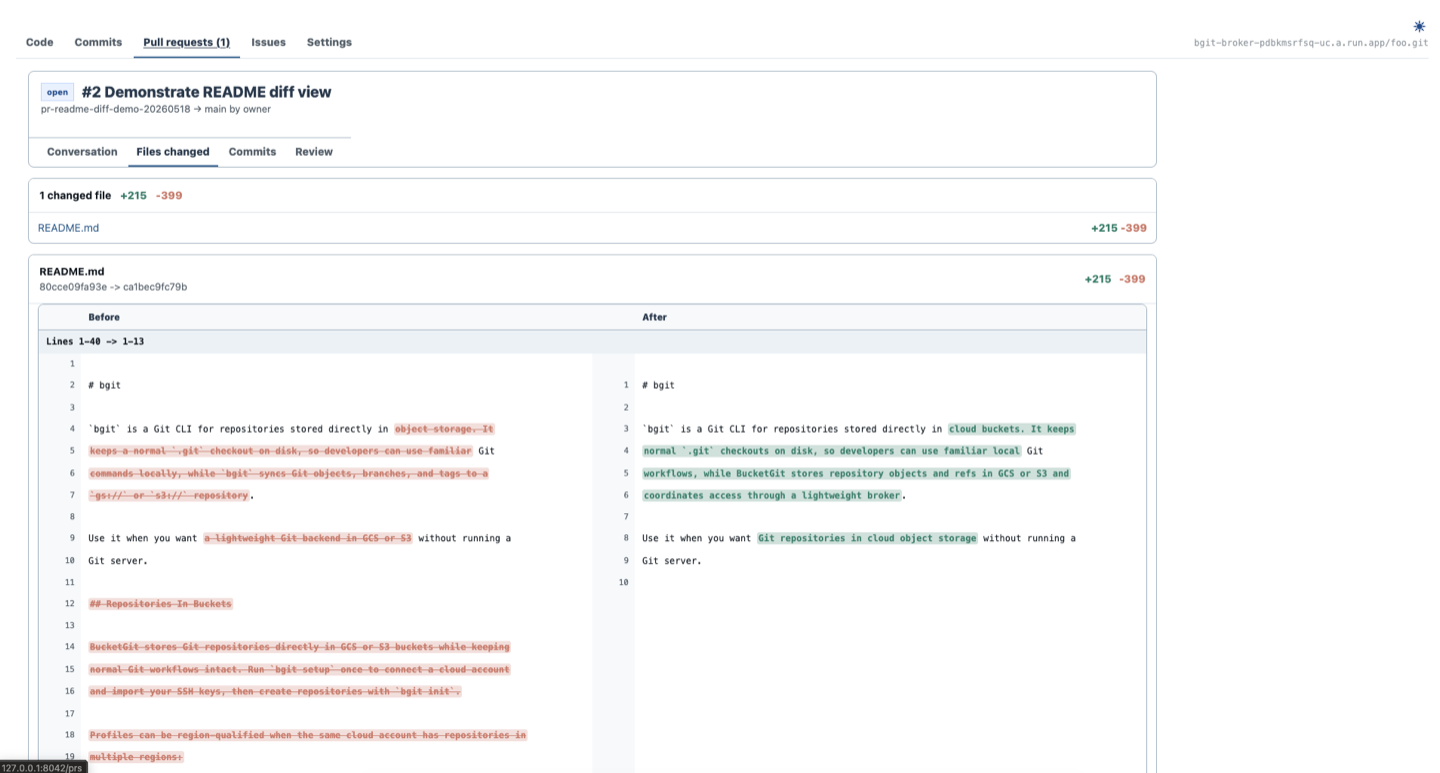
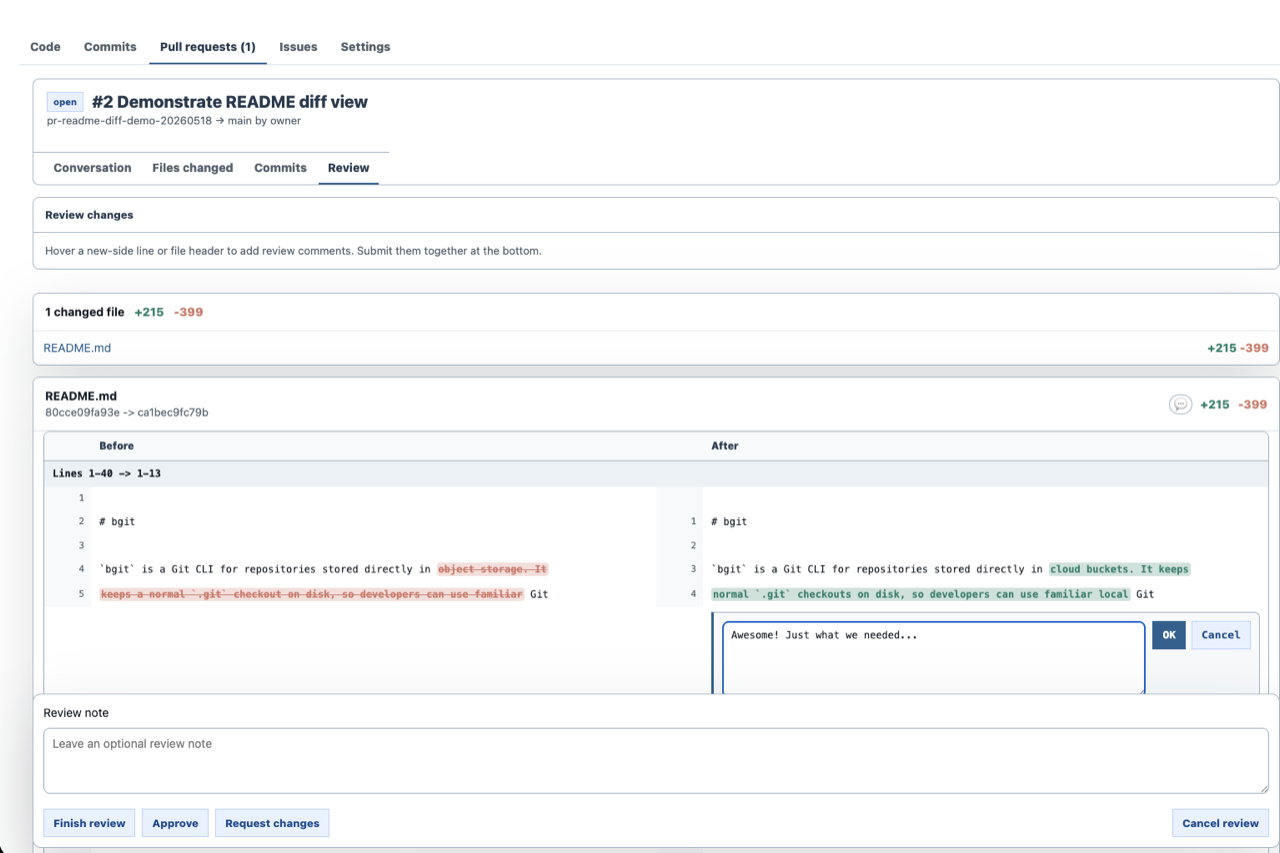
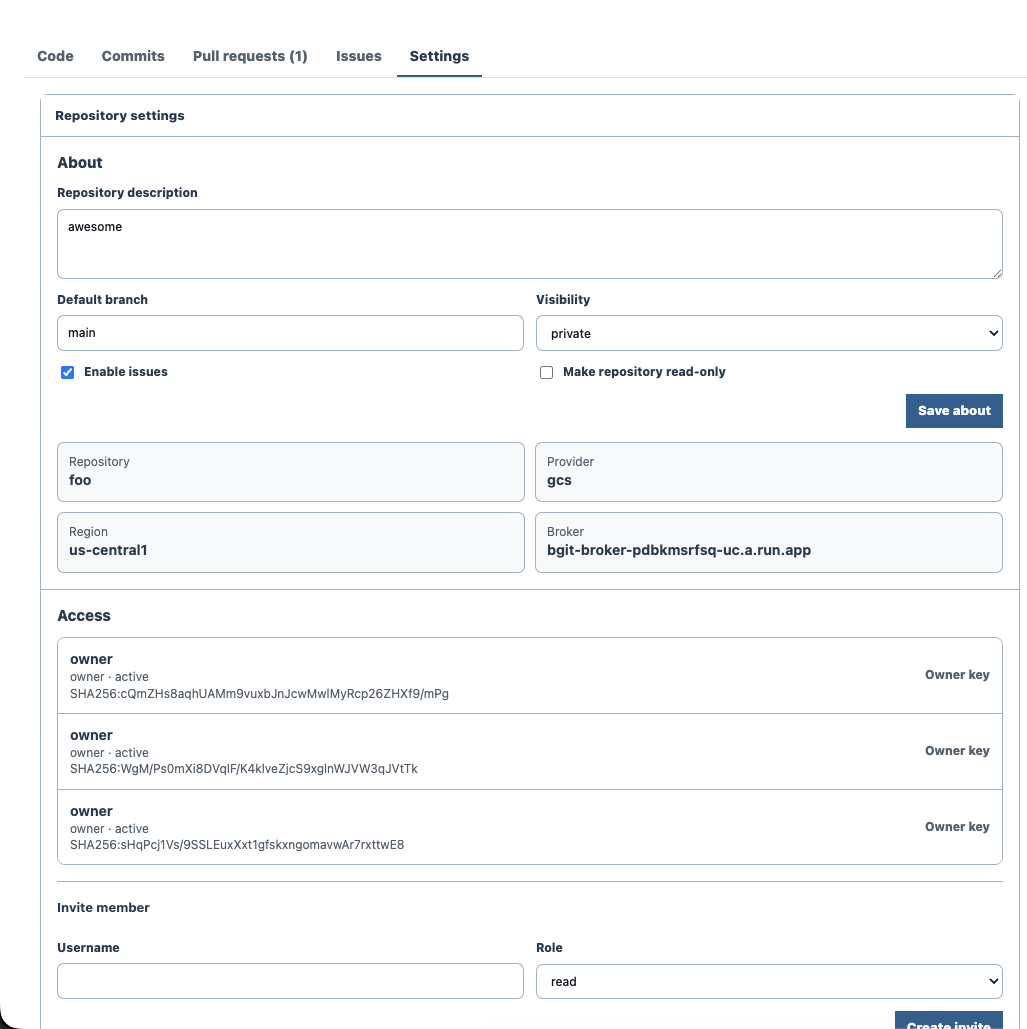
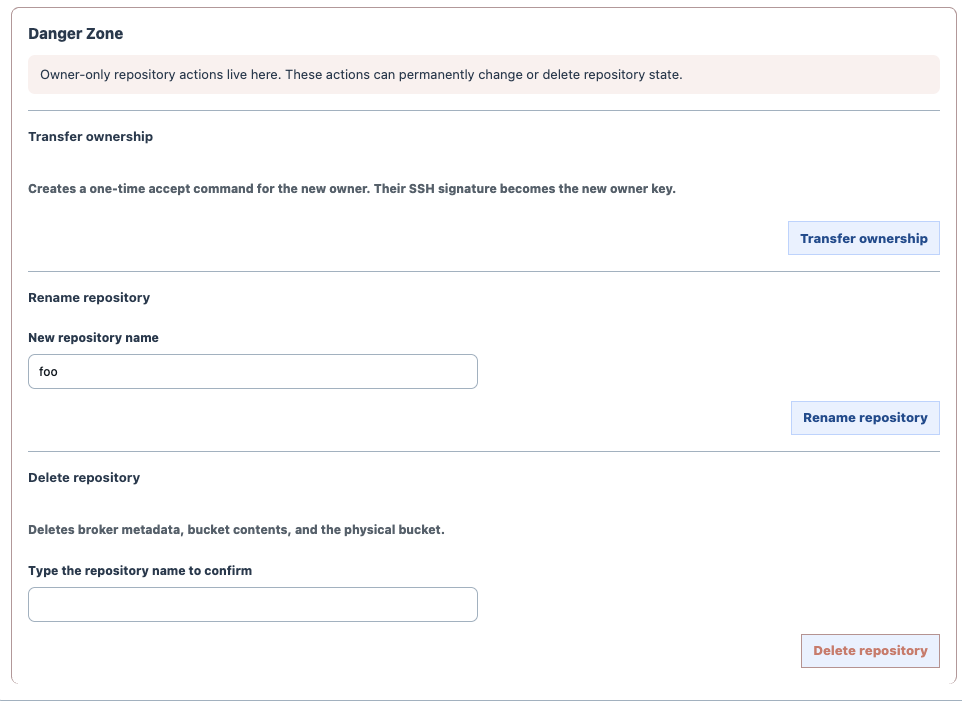
The local web UI renders repository state, pull requests, review comments, task boards, CI runs, settings, and owner-only controls from the configured broker while preserving the normal Git checkout on disk.
Collaboration
BucketGit stores collaboration metadata beside the repository namespace. Developers can plan work, open pull requests, run CI, review diffs, and merge protected branches without introducing a separate Git server.
bgit board list
bgit board create "As a maintainer, I want release CI."
bgit board edit BG-1 "As a maintainer, I want release CI status."
bgit board take BG-1
bgit board assign BG-1 ada
bgit board move BG-1 review
bgit board priority BG-1 1
bgit board comment BG-1 "PR #4 is ready."
bgit board archive BG-1
bgit board list --archivedbgit pr create --title "Add docs" --source feature/docs --target main
bgit pr diff 1
bgit pr approve 1 "Looks good"
bgit pr merge 1 --delete-branchbgit ci run --ref feature/docs
bgit ci run --ref feature/docs --config cloudbuild.yaml --provider gcp
bgit ci run --ref feature/docs --config buildspec.yaml --provider aws
bgit ci watch 1bgit issue create "Missing docs" --body "Add setup examples."
bgit issue list
bgit issue comment 1 "I can take this."
bgit issue close 1Native CLI
Local commands are implemented by bgit for normal
checkout workflows. Remote commands use broker-issued object
transfer capabilities while protected ref updates remain broker
owned. Fetch and push keep native origin/*
remote-tracking refs aligned with BucketGit's broker-tracking refs.
Stage, commit, inspect, and move through history without leaving the bgit CLI.
$ bgit status
M README.md
?? docs/setup.mdDocumentation
bgit creates normal .git checkouts locally
and stores remote Git objects and refs in GCS or S3 while the broker
handles identity, authorization, repository metadata, and protected ref
updates.
Install with Homebrew, download a release binary, or build from source.
brew tap bucketgit/bgit
brew install bgit
bgit --versiongit clone https://github.com/bucketgit/bgit.git
cd bgit
go build -o bgit .
The default workflow starts with bgit setup. It is
the interactive broker setup and management tool: discover cloud
profiles, choose broker regions, create or update brokers, import
owner SSH keys, manage users and teams, and write
~/.bgit/config.yaml.
bgit setup
bgit setup profile create --provider gcp work
bgit setup profile create --provider aws work
Profiles are provider- and region-aware. If a profile has more
than one configured region, pass --region or use a
region-qualified profile name.
bgit admin repo create --team core app
bgit init --noninteractive --repo app --profile work.europe-west1 --team core
bgit push --profile work --region europe-west1Cloud credentials are used for initial setup and broker upgrades. Day-to-day clone, fetch, pull, push, review, and web browsing use SSH-key-signed broker access through the configured broker.
Broker setup uses one-time owner bootstrap tokens, and newer brokers verify replay-resistant v2 request signatures. CI materializer tokens are stored as managed cloud secrets and can be rotated from the CLI.
bgit admin broker upgrade
bgit admin broker owner-bootstrap reset
bgit admin ci rotate-secret
Local broker repositories use the same broker authorization and
ref-safety model without deploying shared cloud broker
infrastructure. The broker runs in-process as part of
bgit, and repository metadata is stored with the
repository under .bucketgit/broker-state/.
bgit clone file://app.git
bgit clone s3://app.git --profile work --region eu-west-1
bgit clone gs://app.git --profile work --region europe-west1
file:// repositories are stored below
~/.bgit/local-broker or
$BGIT_HOME/local-broker. Cloud-backed local broker
repositories use one bucket per repository, named from cached AWS
account ID or GCP project ID plus the repository name.
Normal repositories are flat logical names managed by the broker. The broker maps each logical repo to a physical bucket and prefix, creates missing buckets when allowed, and hides collision-resistant bucket suffixes from everyday commands.
bgit admin repo create --team core app
bgit init
bgit init --noninteractive --repo app --profile work.eu-west-1 --team core
bgit clone https://broker.example.com/app.git ./app
bgit clone https://broker.example.com/core/app.git ./app
bgit clone https://broker.example.com/core/app/app.git ./app
bgit push
bgit clone and bgit init create standard
.git directories. bgit init also writes
core.sshCommand, so native Git fetch and push use the
BucketGit SSH bridge.
Custom clone domains use exact-FQDN TXT discovery. For
https://git.example.com/platform/app.git, publish the
record at _bgit.git.example.com. The public
name maps to the opaque broker team identifier.
v=bgit1 broker=https://broker.example.com team=t_abcd1234 name=platform
bgit clone https://git.example.com/platform/app.git ./app
bgit clone https://git.example.com/platform/app/app.git ./app
Flat broker URLs continue to map through the default
core team, while explicit team broker URLs remain
available for deployments without DNS discovery.
bgit status
bgit add -A
bgit commit -m "Update"
bgit diff
bgit show HEAD
bgit restore README.md
bgit reset --hard HEAD
bgit stash
bgit revert HEADbgit checkout -b feature/storage
bgit branch
bgit merge feature/storage
bgit tag v0.3.0
bgit push --tagsbgit grep broker
bgit blame README.md
bgit describe
bgit ls-files
bgit ls-tree -r HEAD
bgit archive HEAD > source.tar
bgit rev-parse HEADbgit fetch
bgit pull
bgit push
bgit push --delete feature
bgit ls-remote
bgit whoami
bgit repos mine
bgit setup manages the broker and imports owner SSH
keys. bgit init configures a repository so standard
Git clients use bgit as the SSH command. The broker
stores logical repositories, SSH public keys, PRs, branch
protection, and compare-and-swap ref updates.
bgit setup
bgit admin repo create --team core app
bgit init

git fetch
git push
git clone bgit::https://broker.example.com/app.git
git clone bgit://app.git
git remote add archive bgit::gs://bucket/path/app.git
bgit clone https://broker.example.com/app.git ./app
Key roles are owner, admin,
maintainer, developer,
triage, and read. Suspended keys are
rejected. If branch protection requires PRs, direct pushes to
protected refs are rejected unless owner/admin override is enabled.
Broker-mediated object transfer uses short-lived capabilities.
AWS brokers can issue scoped STS credentials. GCP brokers issue V4
signed URLs and resumable upload sessions. Final ref updates stay
broker-owned and are protected by role checks, branch rules, and
compare-and-swap. bgit fetch and
bgit push also update matching
origin/* tracking refs so native
git status reports the same ahead/behind state.
When installed as git-remote-bgit, the same binary
also supports native Git bgit:: and
bgit:// remotes.
bgit admin keys list
bgit admin keys add --user ada --role developer --key ~/.ssh/ada.pub
bgit admin keys import-github octocat --role triage
bgit admin keys suspend KEY_OR_FINGERPRINT
bgit admin keys remove KEY_OR_FINGERPRINT
bgit web serves a local repository browser on
127.0.0.1:8042. By default it uses the repository's
broker configuration, seeds from local state for fast rendering,
then synchronizes remote state in the background.
bgit web
bgit web --port 9000
bgit web --local
The web UI includes branch and tag navigation, clone commands, file browsing, commit diffs, pull-request creation with mergeability/conflict status, task boards with drag-and-drop or CLI priority ordering, archived-story browsing and activity history, CI logs, issues, repo settings, user profile settings, capability-aware controls, local dirty/staged/unpushed state, and background broker sync.
Pull requests, issues, and task-board stories are broker metadata, not Git protocol objects. They are scoped to the repository namespace and respect the same SSH-key identity and role model as fetch, push, and branch protection.
bgit board list
bgit board create "As a developer, I want CI logs on each run."
bgit board edit BG-1 "As a developer, I want CI logs and status on each run."
bgit board take BG-1
bgit board assign BG-1 ada
bgit board move BG-1 done
bgit board priority BG-1 1
bgit board comment BG-1 "Merged in PR #4."
bgit board archive BG-1
bgit board list --archivedbgit pr create --title "Add docs" --source feature --target main
bgit pr diff 1
bgit pr merge 1
bgit issue create "Missing docs" --body "Add setup examples."
bgit issue close 1CI run records are broker-backed. A run is requested for a broker ref and commit, then handed to the trusted provider/materializer path after the broker verifies repository state.
bgit ci list
bgit ci run --ref feature/docs
bgit ci run --ref feature/docs --config cloudbuild.yaml --provider gcp
bgit ci run --ref feature/docs --config buildspec.yaml --provider aws
bgit ci view 1
bgit ci logs 1
bgit ci watch 1
GCP builds use Cloud Build configuration such as
cloudbuild.yaml. AWS builds use CodeBuild
configuration such as buildspec.yaml. Alternate YAML
files can be passed with --config.
bgit admin manages broker users, roles, repository
access, settings, and branch protection.
bgit admin keys list
bgit admin keys add --user ada --role developer --key ~/.ssh/ada.pub
bgit admin keys import-github octocat --role triage
bgit admin invite-user --broker https://broker.example.com --user ada --role developer app.git
bgit admin accept-invite CODE
bgit admin invite-broker-user --broker https://broker.example.com --user ada --role user
bgit admin accept-broker-invite CODE
bgit admin protect add main

bgit admin broker-users list
bgit admin teams create platform
bgit admin teams member add TEAM_ID ada --role developer
bgit admin teams repo add TEAM_ID developer
bgit admin ci rotate-secret

bgit pr create --title "Add docs" --source feature --target main
bgit pr merge 1

bgit issue create "Missing docs" --body "The setup page needs examples."
bgit issue list
bgit issue comment 1 "I can take this."
bgit issue close 1
Roles are owner, admin,
maintainer, developer,
triage, and read. Protected branches can
require pull-request merges, with optional owner/admin override.
bgit admin repo visibility public
bgit admin repo visibility private
bgit admin repo readonly on
bgit admin repo readonly off
bgit admin repo issues on
bgit admin repo issues off
bgit admin repo rename new-name
bgit admin repo delete --yesbgit admin confirm-ownership-transfer --broker https://broker.example.com app.git
bgit admin accept-ownership-transfer CODE
bgit admin cancel-ownership-transfer --broker https://broker.example.com app.git
rebase, LFS, submodules, worktrees, server-side
hooks, credential helpers, and repository maintenance commands
such as gc, fsck, repack,
and prune are not implemented. Local merge,
cherry-pick, revert, blame, and diff support covers practical
day-to-day workflows, but does not aim to be a complete
reimplementation of every Git porcelain edge case. The SSH bridge
implements the native Git fetch/push protocol used by normal Git
clients for BucketGit repositories.